Sign inCreate free account

Open source · Free alpha · Bring your own AI

Write requirements, trace them to tests and keep the evidence. AI agents help, and every change they make is on the record.

OpenV does the work of the established requirements tools and is open source, so you can host it yourself free with every feature. Each requirement keeps a stable reference and its full history. You baseline a project, record test results against it and download it as a document. Agents propose changes for your team to approve, and they run on your own AI subscription.

No card. No trial clock. Export your data whenever you like.

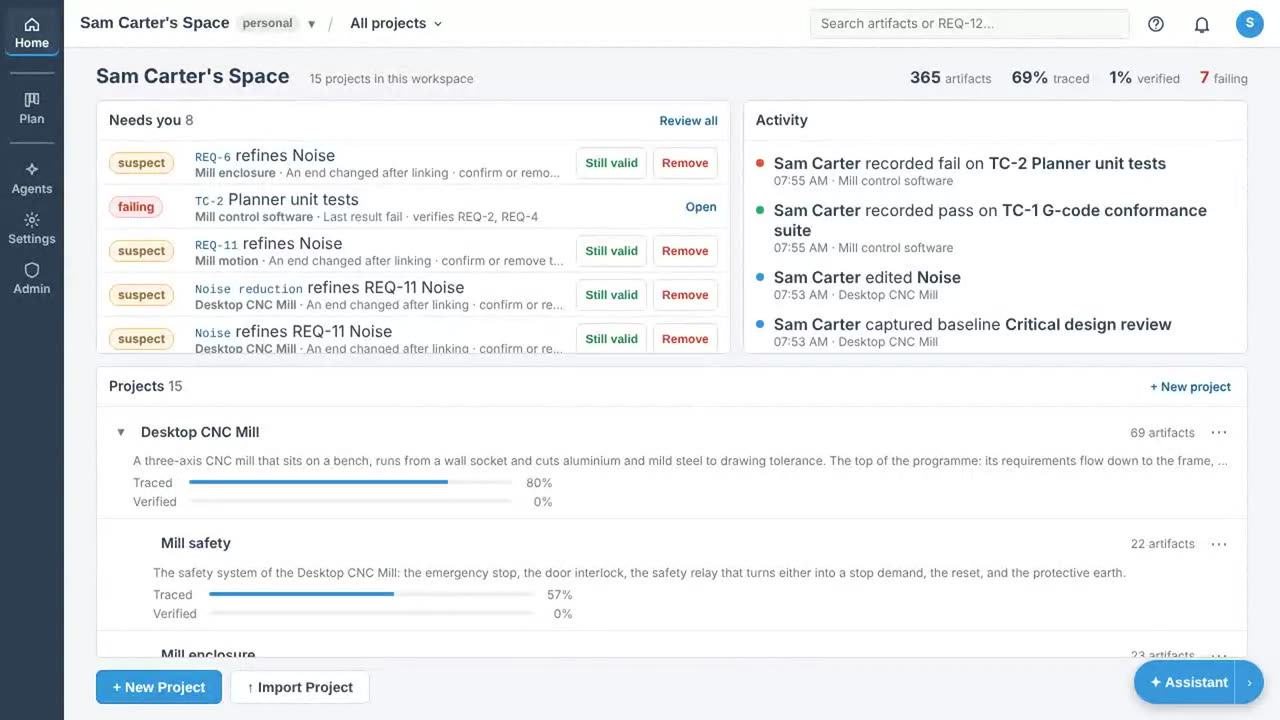
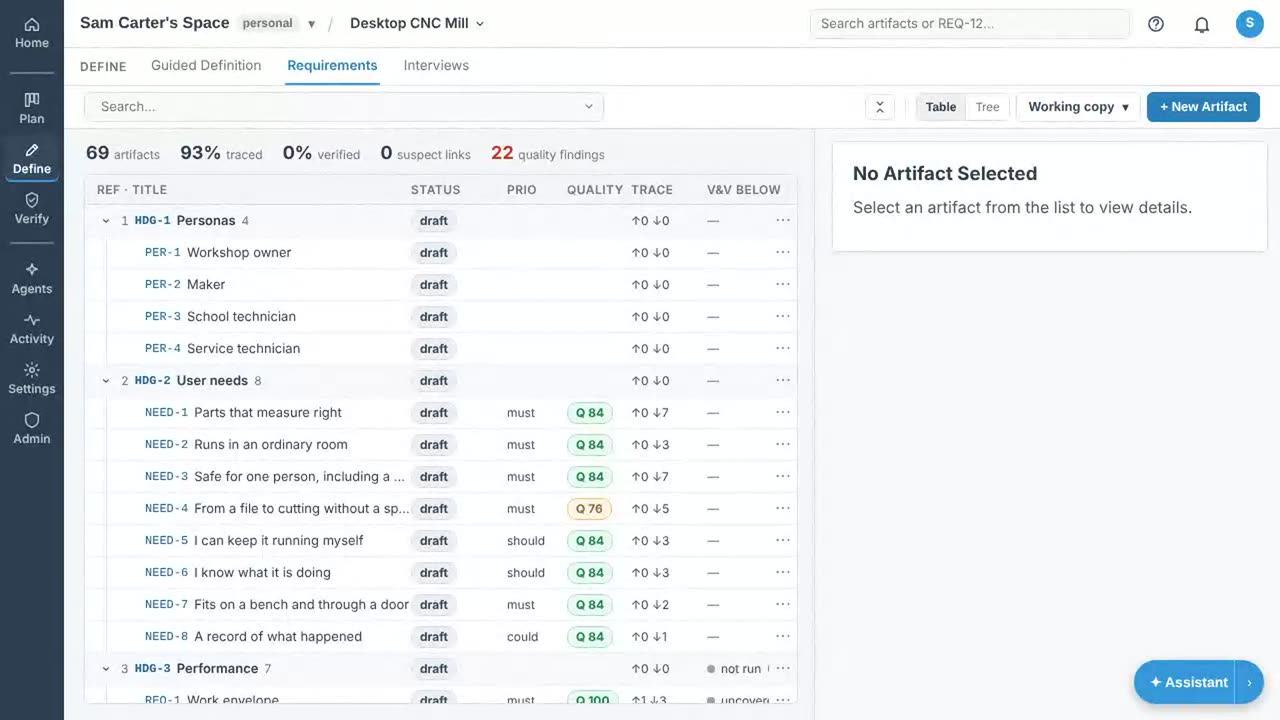
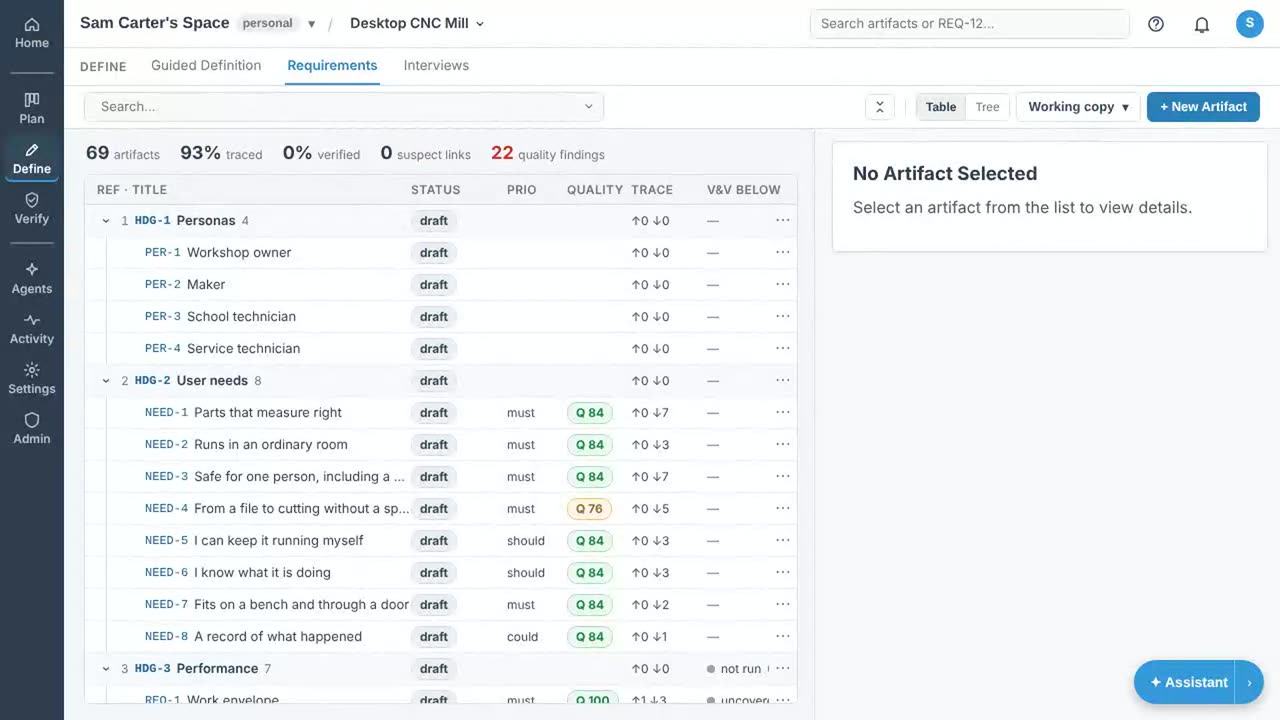
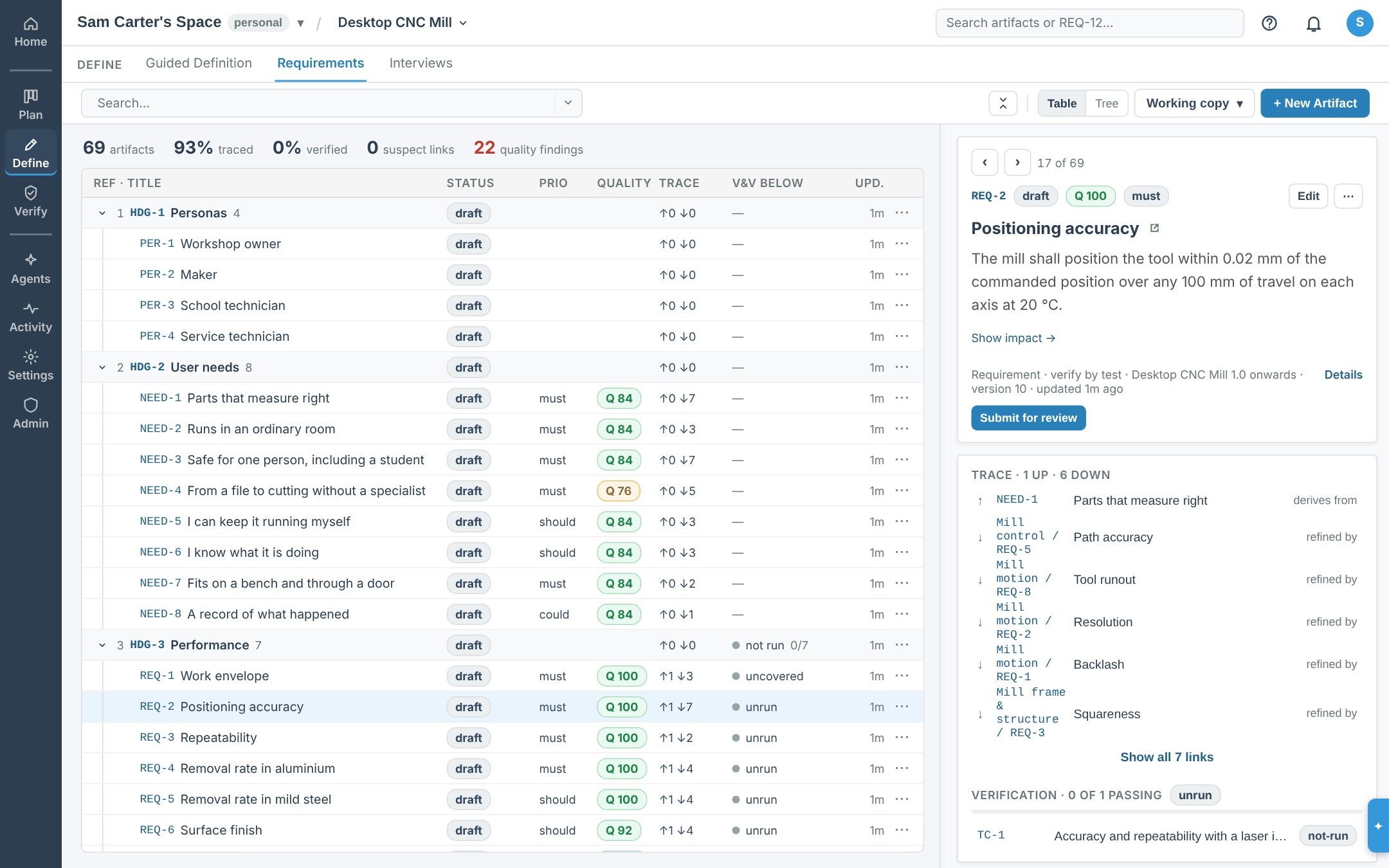
The Desktop CNC Mill's requirements in OpenV: the table of needs and requirements with their quality scores and verification, beside a requirement with its trace to the requirements in child projects that refine it
A requirement beside the table it belongs to, with its trace into the projects that refine it.

See it working

Five narrated recordings on the platform’s own requirements project, three on a desktop and two on a phone. No slides, nothing staged.

What it does

OpenV holds what your product must do, why, and the evidence that it does. Every artifact has a stable reference, a history and typed links, so you can see what changed and what the change affects.

Requirements and traceability

Write requirements, user needs, design items, hazards and test cases, each with a reference that never changes. Link them by type, and OpenV flags a link for review when either end changes. Every version is kept, and a baseline freezes the project as it stood.

Verification evidence

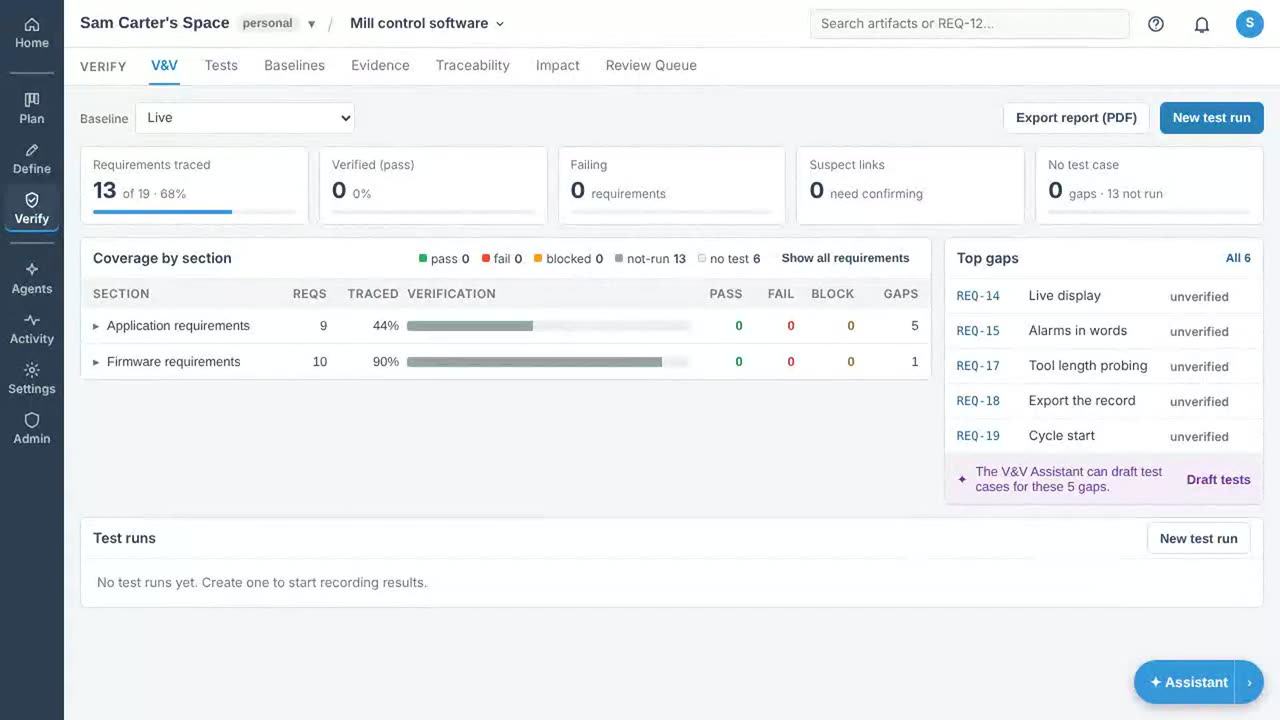
Record a test run, and each result counts for the requirements its test case verifies. Coverage, the gap list and the traceability matrix follow the links as you change them. The V&V status downloads as a PDF.

Agents with human review

An agent reads your project through a fixed set of tools and writes back as proposals, which you approve or reject one by one. Start a run from a card on the board, on a schedule, or when something happens in the project.

Stakeholder interviews

Send a stakeholder a link. An interviewer agent asks what they need and records each answer as a draft user need for your team to review.

Documents and hand-over

Download a specification as PDF or Word with the sections, fields and evidence you choose, from the live project or from a baseline. Exchange ReqIF with a customer’s tool. Send a share link to someone who only needs to read.

Programmes with subsystems and suppliers

Give each subsystem and each supplier a project of its own under the main one. Their requirements refine the ones above, and their test results count toward them. Each artifact names its owner, so it is clear who is responsible for what.

By industry

What each industry’s standards ask for, which parts of that OpenV holds, and what it leaves to other tools. All industries

Aerospace and defence

Programmes with systems, items and suppliers, working to ARP4754A, DO-178C or DO-254.

Automotive

Teams tracing safety goals to tests under ISO 26262, or assessed against Automotive SPICE.

Medical devices

Design controls from user need to validation, for teams working to ISO 13485, IEC 62304 and ISO 14971.

Rail

Signalling and rolling stock teams keeping requirements and a hazard record under the EN 5012x standards.

Industrial and machinery

Machine builders with a risk assessment, safety functions and a technical file to keep in step.

Space

Missions and CubeSat teams keeping a requirements baseline and a verification matrix for ECSS or NASA reviews.

Software and digital products

Teams whose product is the software and who need requirements that outlive the ticket.

Education and research

Lecturers, capstone projects, student competition teams and research labs.

Hardware start-ups and product teams

Small teams with no standard to meet yet and a spreadsheet that has stopped working.

How it fits together

Needs, requirements, design and tests in one typed graph; agents that propose and people who approve; baselines, documents and share links to hand the result over. The diagrams are on one page.

Share a link
A public link opens the live project read only, no account needed; a reviewer link lets someone comment without editing.
On a phone
Review, approve and comment with a thumb; install it and get notifications as pushes.
Flow-down
Subsystems and suppliers work in their own projects, refining the requirements above them.
Documents
PDF and Word with the sections and fields you choose, from the live project or a baseline.

Your data is yours

Your data is never behind the paywall. Export and import stay available on every plan, whatever its state, and a JSON export restores into a self-hosted OpenV.

PDF specification
The document as a reader sees it: sections, artifacts, figures and traceability.
Word document
The same specification as a .docx, for editing or review outside OpenV.
JSON data
The complete project, including everything an OpenV import can restore.
CSV table
One row per artifact for a spreadsheet.
Excel workbook (.xlsx)
A sheet per artifact type, one for the links, and a cover naming the snapshot.
ReqIF interchange
The OMG format read by DOORS and Polarion.

Import reads JSON and ReqIF. Every download can snapshot a baseline instead of the live project, and the archive download carries your attachments with it.

Pricing

The hosted service is free while in alpha. Self-hosting is free for good. Paid tiers are for teams and for agents that run unattended.

Workspaces created during the alpha keep every tier’s features, free, with no member limits. That does not change when tiers turn on. Workspaces created after that are on the tiers below. Export never depends on a plan.

Hosted by us

Single User

Free

The whole product for one person, free. Bring your own AI.

  • Requirements, V&V, traceability and interviews: the full product for one person.
  • Agents run on your own AI subscription (Claude Code, Codex or Gemini) via the Agent Connector on your machine, or a leased cloud runner within the free limits.
  • Personal workspace, plus one shared workspace with one other person.
  • Export everything, always.
Create free account

Business Lite

Coming soon

For one person who wants agents working while the laptop is closed.

  • Everything in Single User.
  • Higher cloud runner limits: 4 GB memory, 2 CPUs, 120-minute lease reclaimed after 20 idle minutes.
  • Attach figures up to 512 MB, so a CAD assembly goes on the requirement it belongs to.
  • Agents on your own API keys instead of a signed-in CLI.
  • Always-on agents: a hosted runner that keeps cron and event automations running unattended.
Tell us you want this

Business

Coming soon

For companies working on the same products together.

  • Everything in Business Lite.
  • Larger cloud runners: 8 GB memory, 4 CPUs, a 4-hour lease reclaimed after 30 idle minutes.
  • Attach figures up to 1 GB.
  • Shared company workspaces.
  • Teams, per-project access and the reviewer role.
  • Workspace AI budget and usage reporting.
  • Monthly stable release channel, turned on at a time you choose.
Tell us you want this

Enterprise

Coming soon

For organisations that need their own instance, single sign-on or integrations.

  • Everything in Business.
  • Run on your own servers with our support.
  • SSO/OIDC and directory setup.
  • Custom integrations with your PLM, ALM, ticketing or CI.
  • Support SLA and priority fixes.
Tell us you want this

What free means on the hosted service today

  • One shared workspace you create, with one other person; leased cloud runners for 300 minutes a month.
  • Hosted runner: 2 GB memory, 1 CPU.
  • Cloud runner lease: 60 minutes, reclaimed after 15 idle minutes.
  • Largest figure you can attach: 128 MB.
  • Cloud runners come from a shared pool, so at busy times you may wait for one.
  • Hosted runners cannot reach code repositories. Run the Agent Connector on your own machine for that.
  • Agent runs use your own AI subscription (Claude Code, Codex or Gemini) or your workspace’s own API keys. OpenV does not resell AI.

Business Lite will raise those to:

  • Leased cloud runners: no monthly cap.
  • Cloud runner: 4 GB memory, 2 CPUs.
  • Cloud runner lease: 120 minutes, reclaimed after 20 idle minutes.
  • Largest figure: 512 MB.

And Business again, to:

  • As many shared workspaces and members as you need; members are what is billed.
  • Cloud runner: 8 GB memory, 4 CPUs.
  • Cloud runner lease: 240 minutes, reclaimed after 30 idle minutes.
  • Largest figure: 1 GB.

Prices are per workspace, monthly or yearly, and shown excluding VAT; VAT is added at checkout where it applies, and a business VAT number is accepted. What is free stays free for the workspaces that have it, and export never depends on a plan.

Other ways to run OpenV

Self-hosted

Free forever

Every feature, on your own hardware, under the MIT License. We set no limits.

  • One command: git clone, docker compose up.
  • Your data never leaves your machines.
  • Same agents, runners and export as the hosted service.
  • Hosted-runner limits do not apply.
Self-host guide

Charities and open source

Free forever

Registered charities and open-source projects use the hosted service free, for as long as it exists.

  • Everything in the hosted service.
  • Stays free when tiers launch.
  • Claim it with a GitHub issue: tell us who you are and the workspace name.
Claim free hosting

Latest news

Announcement ·

OpenV beside Codebeamer, StrictDoc and Doorstop

Two new comparison pages: OpenV beside PTC Codebeamer, and beside StrictDoc and Doorstop, which keep requirements as files in Git.

Video ·

New videos, and every feature screen by screen

Five new narrated videos of OpenV at work on a desktop CNC mill, with captions and transcripts, and a feature tour with screenshots.

Release · · version 0.36.0

OpenV 0.36: projects from a script or an AI app

A runner key can now create projects, and a connected AI app such as Claude can create one and file it under a parent project.

All news

Open-source projects

Open-source teams host free, and their latest baselines are public for anyone to read.

See the projects

Customer stories

Teams using OpenV, in their own words, as they come in.

Read the stories

White papers

Longer reads on agents in the audit trail, flow-down and leaving DOORS.

Browse the papers

Self-host in one command

Docker is the only prerequisite. The stack brings its own database, migrates itself on boot, and the first account to register becomes the admin.

Read the quick start
$ git clone https://github.com/desktopmachineshop/OpenV.git
$ cd OpenV
$ docker compose up -d

Open source, and built in the open

OpenV is open source, licensed under the MIT License. Use it, fork it, change it, redistribute it and build on it, commercially or not, with every feature. The one thing the licence asks is attribution: keep the copyright and licence notice with any copy you pass on.

  • Self-host free, at any scale, with every feature. No licence key, no phone-home, no seat count.
  • Read, fork and modify the source; keep your changes private or publish them.
  • Redistribute it, sell it, or run it as a hosted service for others: all allowed.
  • Asked in return: keep OpenV’s copyright notice and the licence text with any copy you pass on.

OpenV manages its own requirements in OpenV: the live project holds every requirement the platform is built to, with traceability to the tests that prove it. Contributions are welcome under the Developer Certificate of Origin.